
A backlink that sends 500 visitors and zero qualified leads is not necessarily worthless, but it is not a conversion winner either. Too many SEO reports stop at referring domains, authority metrics, or referral sessions and never answer the question that matters: did this placement produce a business outcome?
GA4 can help you track conversions from referral backlinks, but only if you set up meaningful key events, make placements identifiable, and connect analytics data with your link-building and CRM records. This guide walks through the process without pretending that any single attribution report can tell the whole story.
Define what counts as a referral backlink conversion
Start by separating three things that are often reported as if they were interchangeable: referral sessions, engaged visits, and conversions. A referral session means someone arrived after clicking a link on another website. An engaged visit indicates they did more than immediately leave. A conversion, or key event in GA4 terminology, means they completed an action your business considers valuable.
A referral backlink can create value in several ways. It may directly send a visitor who books a demo in that same session. It may introduce a prospect who returns later through organic search or branded direct traffic. Or it may send a smaller number of highly relevant visitors to a page where they take the next commercial step.
For B2B and SaaS teams, traffic volume alone is a weak measure of backlink performance. A niche industry publication that sends 25 visitors and two qualified demo requests can be more valuable than a broad publisher that sends 2,000 readers who never become prospects.
Choose primary and micro-conversions
Choose one or two primary conversions that reflect genuine business value. Common examples include demo requests, free-trial activations, purchases, consultation bookings, and qualified lead submissions. These should be the outcomes used to judge whether referral traffic is producing commercial results.
Add a small set of micro-conversions that signal movement toward those outcomes. Useful choices include pricing-page views, signup starts, product-page engagement, template downloads, webinar registrations, or a high-intent content download. A visitor who arrives from a guest post, views a pricing page, and starts a trial has delivered more evidence of value than someone who reads one blog post and leaves.
Do not use generic pageviews as your sole conversion metric. Pageviews are useful context, especially for content-led campaigns, but they do not tell you whether a backlink is reaching the right audience or advancing pipeline.
Set up GA4 conversion events before evaluating links
You cannot measure backlink conversions accurately if the destination site does not reliably record the actions that define success. Before reviewing any publisher, placement, or campaign, make sure GA4 receives events for your primary and supporting outcomes.
Some events may already be collected through your site configuration, form platform, ecommerce implementation, or tag manager. Others may require custom event setup. Once an event is present in GA4, mark it as a key event so it appears in conversion-focused reporting and explorations.
Validate each event before using it in a backlink report. Complete the action yourself in a test environment where possible, then check GA4 Realtime or DebugView to confirm that the event fires once, carries the expected information, and is not duplicated. If event setup involves a complex form, payment flow, single-page application, or CRM handoff, ask your analytics or development team to verify the implementation.
Preserve useful event parameters
A form submission count is a starting point, not the final answer. Preserve parameters that help your team evaluate lead quality, such as lead type, selected plan, form name, downloaded asset, page path, or request category. For example, a demo form submitted from an enterprise pricing page should be distinguishable from a student requesting a generic resource.
Use these details carefully. Never send personally identifiable information, such as names, email addresses, phone numbers, or free-text form responses, to GA4. Keep sensitive lead details in your CRM, where they can be connected to the original acquisition source through approved processes.
Make referral sources identifiable at the link level
The central challenge is that GA4 usually identifies the referring domain or source, not every individual backlink on that domain. If a major publication links to your site from several articles, a basic referral report may show the publisher but not the precise placement responsible for the visit.
Landing-page context can help. If one article links to a comparison page and another links to a research report, the combination of referring domain and landing page may make the source clear. For controlled placements, consistent UTM parameters are even better. For earned editorial links you do not control, maintain a placement ledger that can be matched against GA4 data.
Use consistent UTMs for campaign-controlled placements
Use UTM parameters when you own the link, sponsor the placement, publish a partner asset, or can ask the publisher to use a tagged URL. Keep the convention simple enough that the entire team will follow it.
- utm_source: the publication or partner, such as saasweekly
- utm_medium: referral
- utm_campaign: the initiative, such as digital_pr_q1 or guest_post_product_led_growth
- utm_content: an individual placement identifier, such as saasweekly_ai_search_article
A tagged URL might look like this: https://example.com/guide?utm_source=saasweekly&utm_medium=referral&utm_campaign=guest_post_product_led_growth&utm_content=saasweekly_ai_search_article.
Do not build a naming scheme so elaborate that it becomes inconsistent after two campaigns. The best default is lowercase text, underscores instead of spaces, and a documented convention for source, campaign, and placement names. UTMs are not a retroactive fix for every earned backlink; they work best for links your team controls or can request before publication.
Record non-UTM backlinks in a placement ledger
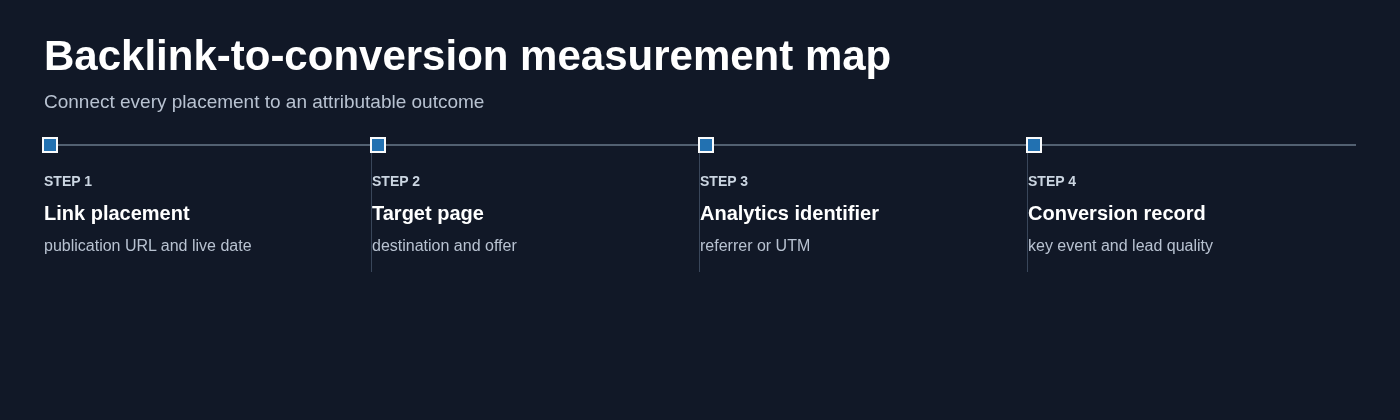
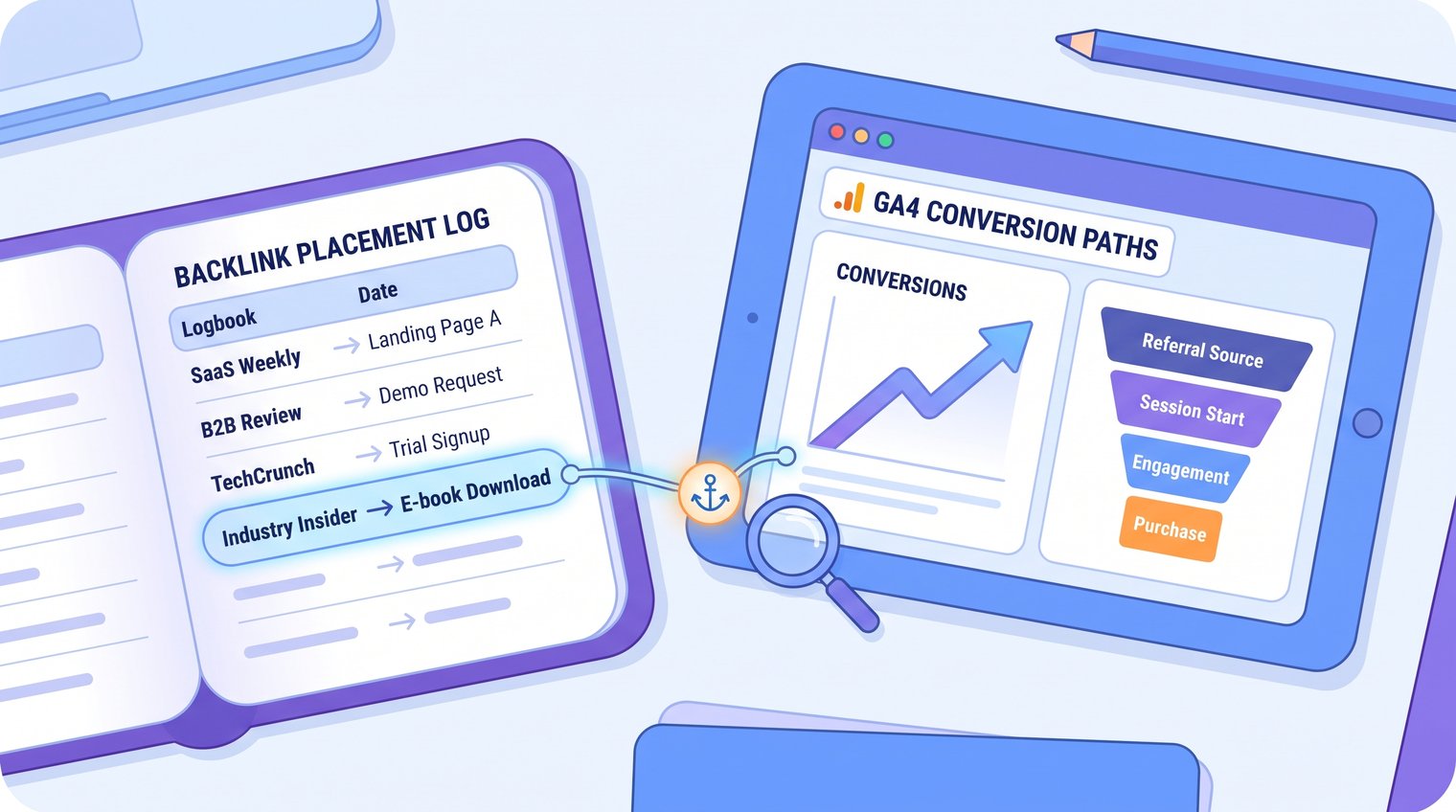
GA4 is not a backlink database. Maintain a spreadsheet, project tracker, or CRM-linked record for every meaningful placement. This creates the bridge between link acquisition activity and analytics evidence.
At minimum, log the linking URL, publication or domain, live date, anchor text, target URL, campaign, and expected referral identifier. Add placement type, such as editorial guest post, contextual insertion, partnership, or PR mention, if you want to compare tactics later. For teams coordinating this work, blogger outreach strategies can help organize the acquisition process before measurement begins.
For example, if an editorial link goes live on May 12 from a known publication to your enterprise landing page, record those details immediately. Later, you can filter GA4 for that domain, start the date range on May 12, and assess the traffic reaching that specific destination.
Find referral traffic in the GA4 Traffic acquisition report
For referral backlink analysis, use GA4's session-level acquisition view. Go to Reports, then Acquisition, then Traffic acquisition. This report is designed to show how sessions began, making it more useful than User acquisition when you are evaluating visits sent by a specific placement.
Use the primary dimension Session source / medium and search for referral traffic or a known referring domain. A source may appear in a format similar to publication.com / referral. If you used UTMs, look for the source, medium, or campaign values from your naming convention.
User acquisition answers a different question: how users were first acquired. That can be useful for broader audience analysis, but it can obscure the performance of a later referral session. For evaluating the immediate traffic delivered by backlink placements, Traffic acquisition is the better starting point.
Use a date range that matches the link's live date
Set the report date range to begin on the day the placement went live. If the article was published on June 15, do not include May data when calculating its performance. Doing so makes the placement look older and more productive than it actually is.
For comparison, use a prior period only when it makes sense. A new landing page, a seasonal campaign, or a major pricing change can make a simple period-over-period comparison misleading. Document the evaluation window in your placement ledger, such as 30 days, 60 days, or quarter-to-date after publication.
Evergreen editorial placements need time. A link in a well-ranked guide may send modest traffic initially and become more valuable months later as the referring article gains visibility. Avoid judging those links after a few days unless the campaign was specifically built around a short news cycle.
Tie referring domains to key events and revenue
Referral sessions matter only when you can see what they do next. Add or inspect metrics for key events, session key-event rate, transactions, and revenue where those metrics apply to your business model. Then filter the report or exploration to referral traffic and evaluate the specific domain, campaign, or landing page.
This will not create perfect attribution. A prospect may click a link, leave, return through branded search two weeks later, and book a demo from a different device. GA4 can report observed session-level outcomes well, but downstream influence requires context from attribution settings and CRM evidence.
Build a referral conversion exploration
Create a reusable Free form exploration in GA4 for monthly backlink reporting. Use a table with Session source / medium or Session campaign as the row dimension. Add a filter for sessions where the medium is referral.
Add these values:
- Sessions
- Key events
- Session key-event rate
- Transactions, if applicable
- Revenue, if applicable
For a more detailed view, add landing page or page path as a secondary breakdown. This lets you see whether visitors from a publication reached the intended destination and whether that destination supported conversion.
Save the exploration with a clear name, such as Referral Backlink Conversions - Monthly. Reusable reporting is important: if your team rebuilds the analysis from scratch every month, definitions and filters will drift.
Check conversion quality, not just conversion count
GA4 can tell you that a form was submitted. Your CRM tells you whether it became a qualified lead, sales-accepted opportunity, pipeline record, or customer. Review both.
A publisher that sends five demo requests may appear weaker than one that sends 20 content-download conversions. But if three of those demo requests become qualified opportunities, the smaller source likely has far greater commercial value. This is why B2B backlink reporting should not end at form fills.
Measure backlink impact by target page
To track backlink impact by target page, pair the referring source with the landing page or page path it sends visitors to. Compare sessions, engagement, key events, and conversion rate for that route. A placement can be relevant and authoritative yet underperform because its target page does not give the visitor a logical next step. For a more detailed framework, see How to Track Backlink Impact by Target Page.
Keep direct referral performance separate from broader SEO impact. A backlink may contribute to authority and future organic visibility, but that effect usually appears over a longer period and cannot be proven solely by a referral traffic report. Look for supporting evidence across rankings, organic landing-page traffic, and the timing of other SEO changes.
Watch for target-page mismatches
A common mistake is blaming the backlink when the landing page is the real problem. A contextual link from an article about calculating SaaS ROI may send the right audience, but a generic homepage gives those visitors no clear route to the relevant product, calculator, case study, or demo.
Check the message match between the referring article and the destination. If the article mentions AI search visibility, send visitors to a relevant guide or service page rather than an unrelated broad resource. Add a clear call to action, keep the next step visible, and make sure internal links lead naturally toward a commercial or lead-capture page.
Conversely, avoid sending early-stage readers directly to a highly aggressive sales page when the source article is educational. A helpful resource page with a relevant next-step CTA may convert better because it matches the visitor's intent.
Measure digital PR backlinks separately from other referral sources
Digital PR needs campaign-level measurement because the traffic pattern is different from a typical evergreen editorial link. A press mention can produce a sharp burst of traffic over several days, while syndication may create multiple versions of the same story across different domains.
Use campaign UTMs when they are available, add a launch-date annotation to your reporting process, and maintain a list of earned coverage URLs. This makes it easier to distinguish a PR wave from ordinary referral activity and to evaluate the total contribution of the campaign.
Account for syndication and attribution gaps
A syndicated story can send visitors from several domains, often with slightly different headlines and linking behavior. Some visits may also appear as direct traffic or another channel because redirects, privacy settings, mobile apps, and lost referrer data can remove the original referral information.
Report what you observed: known coverage, tracked referral sessions, key events, qualified leads, and revenue where available. Then note the attribution limitations instead of assigning every outcome to one press link. That approach is more credible than claiming a single article caused all pipeline created during a launch week.
Combine GA4 data with backlink discovery and CRM evidence
Each data source has a distinct role. GA4 measures on-site sessions, behavior, and key events. Backlink discovery tools help identify newly live links and validate linking pages. Your CRM determines whether those conversions met qualification standards and created revenue.
Reconcile these records monthly. Editorial links may be added after the original campaign ends, removed during content updates, redirected, or changed to point at a different page. Matching live URLs, target URLs, and dates keeps your reporting grounded in the links that actually exist.
Use backlink tools to find missed referring placements
Use backlink indexes to discover links that were not included in your original outreach or PR list. Verify the live URL, anchor text, target page, and approximate discovery date, then add the placement to your ledger before looking for matching GA4 referral activity.
Do not treat a backlink tool's count or authority score as proof of conversion value. Those metrics may help prioritize review, but they cannot reveal whether the placement brought qualified traffic or business outcomes.
Report backlink conversion performance with a decision-ready scorecard
A useful backlink report should lead to a decision, not just show that links were acquired. Build a compact monthly scorecard organized by placement, domain, campaign, and target page.
Include the live date, sessions, engaged sessions, key events, conversion rate, qualified leads, pipeline or revenue when available, and a next action. The next action is where the report becomes operational: repeat the publisher relationship, optimize the landing page, request a more relevant destination URL, or pause the tactic.
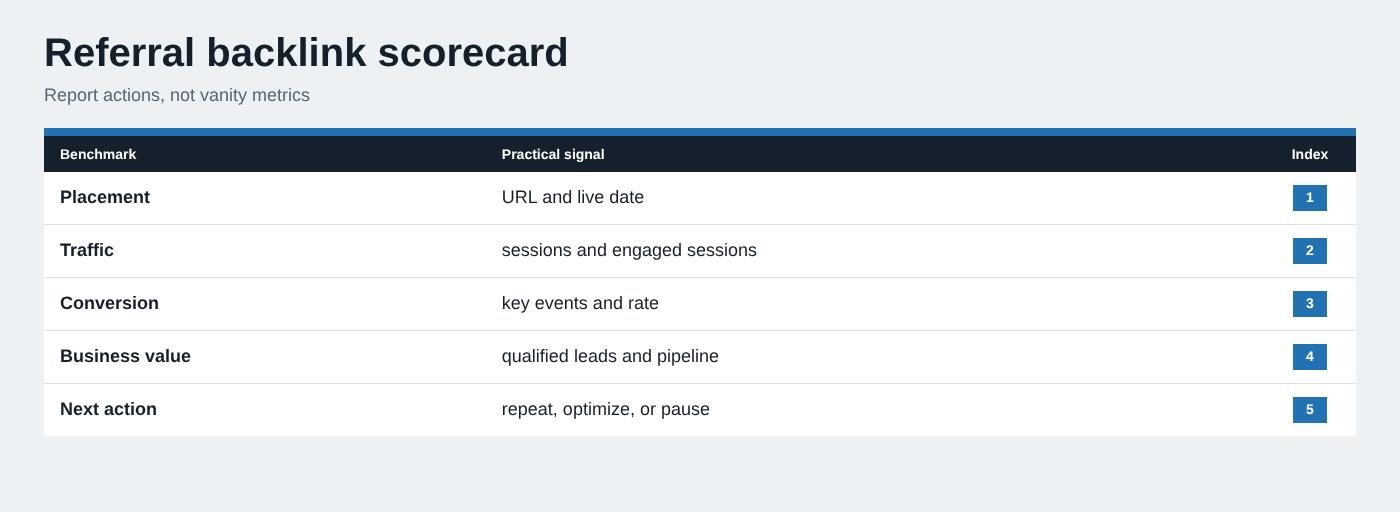
For example, a publisher may have low traffic but a high qualified-lead rate. Mark it for repeat collaboration. Another domain may send plenty of sessions but no meaningful actions; review whether the link context, audience, or target page is wrong before investing further.
Avoid the attribution mistakes that distort backlink ROI
Backlink ROI is easy to overstate and easy to understate. Avoid judging a placement too soon, particularly evergreen content that needs time to rank or attract readers. Also avoid comparing a link that has been live for 180 days with one that has been live for 14 days as if they had equal opportunity to perform.
Do not rely on last-click attribution alone. It is useful for identifying direct session outcomes, but it can miss the role a trusted publication played earlier in a longer buying journey. At the same time, do not use assisted attribution as permission to claim credit without evidence.
Check for internal referrals, payment-provider referrals, and other technical sources that can pollute acquisition reports. Finally, do not treat all form fills as equally valuable. Use consistent lead-quality definitions and document your attribution settings so month-to-month comparisons remain credible.
Turn referral conversion data into better link-building decisions
Reliable referral backlink measurement begins with key events, identifiable placements, and a recurring process that joins GA4 reporting with placement records and CRM outcomes. Once that process is in place, you can move beyond vanity metrics and invest in the publications, content angles, and target pages that create real business value.
Teams that need transparent acquisition records and a conversion-focused authority strategy can discuss a backlink program with LinkHandy.