
A backlink anchor text mapping template is a spreadsheet that records where each backlink points, what anchor text it uses or is expected to use, the source-page context, and the live status. It helps you build a natural, page-level backlink profile without forcing every placement to repeat a commercial keyword.
The important distinction is this: anchor mapping is not about reaching a universal exact-match percentage. It is a planning and quality-control process that keeps link acquisition relevant, varied, and tied to the pages that actually matter to your SEO and business goals.
What Is a Backlink Anchor Text Mapping Template?
A backlink anchor text map is a working document for planned and earned links. Each row represents one referring-page link, whether it is a prospective placement still in outreach or a live backlink that needs verification.
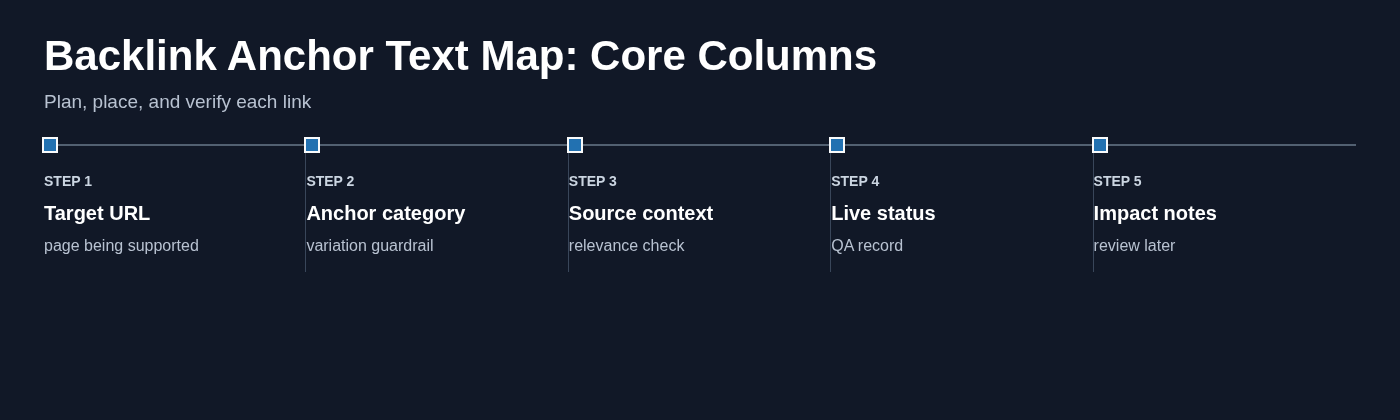
At minimum, the template connects four things: the target URL, the intended or final anchor text, the context of the source page, and the current placement status. That makes it easier to see whether a page is attracting a sensible range of branded, topical, and descriptive links instead of a pile of nearly identical phrases.
You can copy a free backlink anchor text mapping template structure into Google Sheets, Excel, or another spreadsheet tool. A Word-compatible table can work for an initial plan, but a spreadsheet is far better for ongoing updates, filtering, grouping, and audits.
Why Anchor Text Mapping Matters Before You Build Links
Mapping matters because backlinks are not interchangeable. If five new links point to the same SaaS landing page with the same commercial anchor, that repetition is obvious, unnecessary, and often less useful to readers than naturally varied editorial references.
A map gives your team a page-level view before outreach begins. You can prioritize URLs with clear search intent, identify pages that lack relevant authority signals, and avoid over-investing in a single landing page while important supporting content receives nothing.
It also improves outreach briefs. Rather than asking a publisher to insert a rigid phrase, you can communicate the destination page, the subject matter it supports, and several suitable wording options. The publisher still controls the final copy, as they should. The map is a guardrail and record, not a demand for awkward language.
The Essential Columns in a Backlink Anchor Text Map
A useful template is not a generic backlink database. It should help you make decisions before placement, then confirm what went live afterward.
Link destination and page-intent fields
Start with the page being supported, not the phrase you hope someone will use. Add these columns:
- Target URL: The canonical destination page.
- Target page topic: A short description, such as "expense management software for mid-market teams."
- Primary query or theme: The main search topic the page serves.
- Search intent: Informational, commercial investigation, transactional, or another useful classification.
- Priority level: High, medium, or low based on business value and organic opportunity.
Using canonical URLs is essential. Parameterized campaign URLs, HTTP versions, trailing-slash variations, and redirected pages can fragment reporting and make one destination look like several different targets.
Anchor planning fields
Next, capture the wording options and the conditions that make them appropriate:
- Proposed anchor: The preferred wording for the opportunity.
- Anchor category: Branded, naked URL, generic, partial match, topical or semantic, exact match, or image alt text where relevant.
- Semantic variation: Related wording that fits the same destination.
- Surrounding-topic requirement: The subject matter the source paragraph should cover.
- Approved alternatives: Natural backup options if the initial wording does not fit the publisher's copy.
Branded anchors use the company or product name. Naked URLs display the web address. Generic anchors include wording such as "learn more" or "this guide," although these should still make sense in context. Partial-match, topical, and semantic anchors describe the page without mechanically repeating a target query. Exact-match anchors can be appropriate, but only when they genuinely read like a normal editorial reference.
Placement, source, and verification fields
Finally, add the information needed to evaluate the placement and maintain the record:
- Referring domain and source-page URL
- Source-page topic and relevant section
- Placement type: Contextual insertion, guest contribution, resource citation, content partnership, or PR mention.
- Link attribute: Follow, nofollow, sponsored, UGC, or unknown.
- Publication date and live-link status
- Indexed status
- Final anchor text
- Notes: Redirects, editorial changes, placement concerns, or future review items.
The final-anchor column is non-negotiable. Planned wording often changes during editing, and the live page is what should guide future decisions.
How to Build the Template Step by Step
Build the map from target pages outward. Each row should represent one planned or earned link from a referring page, not simply one keyword on a list.
1. List target pages and their search intent
Begin with pages that have a clear reason to earn links: important product pages, high-quality commercial guides, category pages, or resources with realistic organic potential. Do not spread links evenly across every URL just because it exists.
For each page, record the canonical URL, topic, intent, and priority. A comparison page may deserve links from relevant evaluation content, while a research guide may be better suited to citations from educational articles.
2. Inventory existing backlinks and anchors
Export available backlink data from your preferred platform, then manually inspect the links that matter most. Capture the referring page, linked target URL, visible anchor, source context, and live status. A broader SEO link audit can help identify the backlink data and profile issues that belong in the map.
Look for repeated commercial wording, irrelevant source topics, duplicate anchors, or target pages receiving disproportionate attention. Backlink tools provide a starting point; manual review tells you whether the placement is actually useful and editorially credible.
3. Assign anchor categories and realistic alternatives
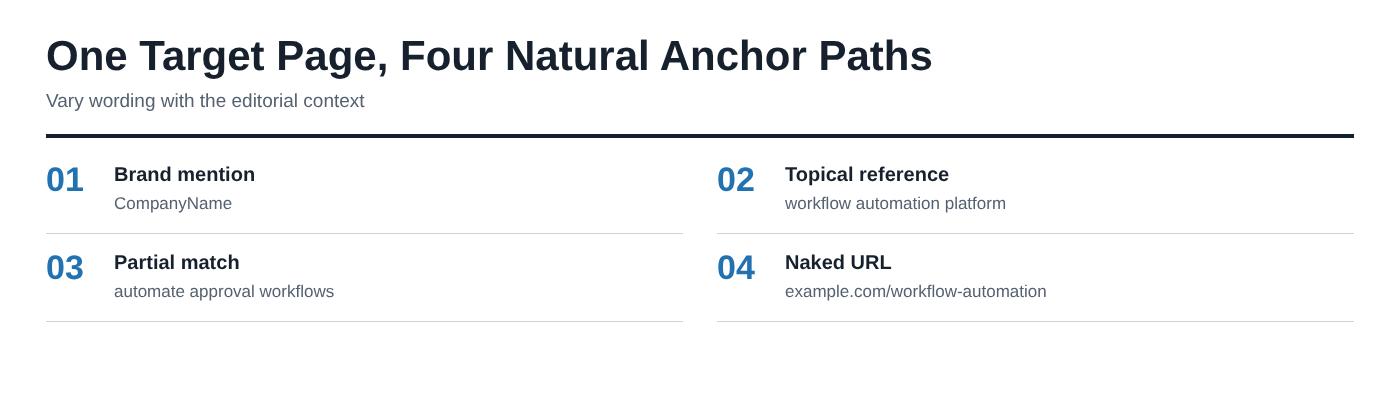
Create multiple natural anchor options for each priority URL. One target page may appropriately earn a brand mention in an industry roundup, a descriptive topical phrase in a workflow article, and a naked URL in a resource list.
Reserve exact-match anchors for rare cases where the phrase fits naturally in a relevant sentence. Do not use arbitrary anchor-text ratios as a replacement for judgment. A profile can have a low exact-match share and still look manipulated if every source is weak or every sentence feels forced.
4. Add placement context and outreach constraints
For every planned row, document the source topic, the sentence-level context needed, and the likely placement type. A contextual insertion in an established article needs different framing than a guest contribution, resource citation, or PR mention.
For example, a page about approval automation should be cited within a discussion of workflows, finance operations, or purchasing processes. It does not belong in a loosely related article simply because the domain has metrics that look attractive.
Publisher standards and reader usefulness should override a forced anchor request. If the natural wording is substantially different but the context and destination are strong, record the final version and move on.
5. Update the row after publication
When a link goes live, replace assumptions with facts. Record the final anchor text, source URL, publication date, link attribute, index status, and whether the destination resolves to the intended canonical URL.
Set a review cadence for important placements. Links can be removed, redirected, edited, deindexed, or changed to nofollow after publication.
How to Audit Anchor Text Distribution Without Chasing a Fixed Ratio
Audit anchor distribution by target page first, then step back to review the domain as a whole. The question is not whether you have hit a predetermined percentage. The question is whether the links make editorial sense for each destination.
Review concentration, repeated language, semantic fit, source relevance, and alignment between the anchor and the target page's intent. For a more structured process, use this guide to audit anchor text distribution for backlinks. A varied set of anchors does not make a profile healthy if the referring pages are irrelevant, low quality, or clearly placed for manipulation.
Review distribution by target page first
Group your rows by target URL and anchor category. If one product page has several links using the same sales-oriented phrase, it is worth changing future outreach guidance even if the site-wide distribution appears diverse.
Compare planned anchors with final live anchors. If editorial partners consistently choose more natural topical wording, that is useful feedback. Adjust future briefs instead of trying to retroactively alter legitimate placements.
Investigate outliers in context, not just percentages
Inspect suspicious or high-value links directly. Read the surrounding copy, assess the source page's topic, check placement prominence, and ask whether a reader would reasonably benefit from following the link.
Sudden bursts of identical anchors, irrelevant pages, and sitewide links are usually stronger warning signs than any single percentage threshold. Context is the thing search engines and real readers can see; a spreadsheet ratio alone cannot tell the full story.
A Sample Anchor Map for One SaaS Landing Page
Suppose a SaaS company has a landing page at example.com/workflow-automation. The goal is to earn editorially relevant links to that page, not to make every publisher use "workflow automation software."
| Source context | Natural anchor example | Anchor category |
|---|---|---|
| Industry roundup mentioning several vendors | CompanyName | Branded |
| Article about reducing approval bottlenecks | workflow automation platform | Topical or semantic |
| Guide to purchasing-process improvements | automate approval workflows | Partial match |
| Curated software resource page | example.com/workflow-automation | Naked URL |
These are illustrative wording patterns, not prescriptions. The best anchor depends on the publisher's sentence, the page's audience, and the role the linked resource plays in the article. A comparison roundup and an editorial citation should not be forced into the same phrase merely because they point to the same URL.
Quality Assurance After a Backlink Goes Live
A live link is not the end of the process. Use the map as a simple QA checklist to confirm that the referring page is publicly accessible, the link resolves to the intended canonical URL, and the final anchor and surrounding copy are accurate.
Record the link attribute rather than assuming it is follow. Also check for unexpected redirects, malformed URLs, links placed in irrelevant sections, or copy changes that weaken the editorial connection.
To check whether the referring page is indexed, search for the exact page URL or a distinctive quoted sentence from the page. If you have access, confirm the status through an index-monitoring workflow or Search Console data for your own properties. Indexing is not immediate or guaranteed, so treat it as a status to revisit rather than a promise made on publication day.
How to Monitor Backlink Changes and Impact by Target Page
Monitor priority links on a schedule based on their importance. Revisit the live source page, compare its current anchor and attribute with your map, and log removals, redirects, page changes, and status updates.
Measure impact at the target-page level alongside organic impressions, rankings, referral traffic, conversions, and growth in referring domains. Tracking backlink impact by target page can make this review more consistent. Annotate placement dates so you can interpret performance changes alongside content updates, technical fixes, seasonal demand, and broader search volatility.
A single backlink rarely proves that it caused a ranking movement. A stronger analysis looks for patterns: whether a prioritized page earned relevant new referring domains, whether its visibility improved over time, and whether the page is fulfilling its commercial or informational role.
Use the Map as a Natural-Link Guardrail
A good anchor text map coordinates relevance, variation, and verification without trying to engineer an artificial-looking backlink profile. It keeps attention on the destination page, the reader's context, and the final live placement rather than a spreadsheet target that ignores editorial reality.
Teams that need help turning a page-level anchor map into transparent editorial placements can consult LinkHandy for managed SaaS and B2B link-building support.